
Document Mgt. for Salesforce (Buyer’s Guide Part 1) | Intro | Episode 11 – The Filtered Brew Podcast
Buyer’s Guide to Document Management for Salesforce – Part 1 (Document Management Basics)
Watch the Video on Youtube
00:00 Podcast Introduction - Tech Sales Podcast Overview & What You’ll Learn (here)
00:49 Document Management for Salesforce (here)
02:17 Buyer’s Guide to Document Management for Salesforce (here)
04:14 Four Types of Document Management Software (here)
06:21 Cloud-Based Document Management Integrations (here)
08:53 Retail Document Management Use Cases: Lowe’s & Ross (here)
15:08 Salesforce Document Management Integration Methods (here)
18:27 Document Management Software for Salesforce Conclusion (here)
WHAT IS DOCUMENT MANAGEMENT | BUYER’S GUIDE (PART I)
Read the Article Version of the Podcast
00:00 Podcast Introduction – Tech Sales Podcast Overview & What You’ll Learn (here)
This is the first episode of a two-part series all about Document Management Software, featuring host Preston Hurd.
We’ve also created a complete Buyers Guide to Document Management Software for Salesforce (here), available on our website for those who want to explore the topic in more depth.
Get ready for some tech talk over coffee. In The Filtered Brew, we filter through the latest digital technology one sip at a time - helping Salesforce professionals make sense of complex software decisions.
Host: Preston Hurd https://www.linkedin.com/in/prestonhurd/
00:49 Document Management for Salesforce (here)
In this episode, we turn our focus to Document Management Software for Salesforce - a topic that’s become increasingly critical as organizations look to scale securely, collaborate more effectively, and integrate Salesforce with the tools their teams already rely on.
Salesforce is the leading CRM platform globally. But maximizing its value requires more than just strong customer data—it requires a thoughtful approach to how documents are stored, accessed, and managed across the enterprise.
With more than 600 Document Management solutions available on the Salesforce AppExchange, choosing the right option for your clients can quickly become overwhelming. While many of these tools appear similar at first glance, they differ significantly in how they store files, integrate with Salesforce, and support security, compliance, and collaboration.
02:17 Buyer’s Guide to Document Management for Salesforce (here)
That’s where the Buyer’s Guide to Document Management for Salesforce comes in.
This guide was created to help IT leaders, Salesforce partners, and admins navigate a crowded and constantly evolving landscape. It simplifies the selection process, highlights meaningful differences between solutions, and shows how the right choice can improve efficiency and security—while integrating seamlessly with enterprise platforms like Microsoft SharePoint, Google Drive, and Box.
This episode is designed to give you the clarity you need to confidently lead the conversation.
Inside the Buyer’s Guide
With so many solutions available, selecting the right Document Management app can feel like a guessing game—unless you have a practical framework to guide the decision.
That’s exactly what this Buyer’s Guide provides.
Inside, we:
Identify the top Document Management apps on the Salesforce AppExchange
Break solutions into clear subcategories
Provide side-by-side comparisons
Call out common pitfalls to avoid
Cut through overlapping features and marketing buzzwords
Show how to add real value for your clients by choosing tools that save time and money
We also include what we call the Retail Spin—real-world retail use cases that bring these concepts to life.
04:14 Four Types of Document Management Software (here)
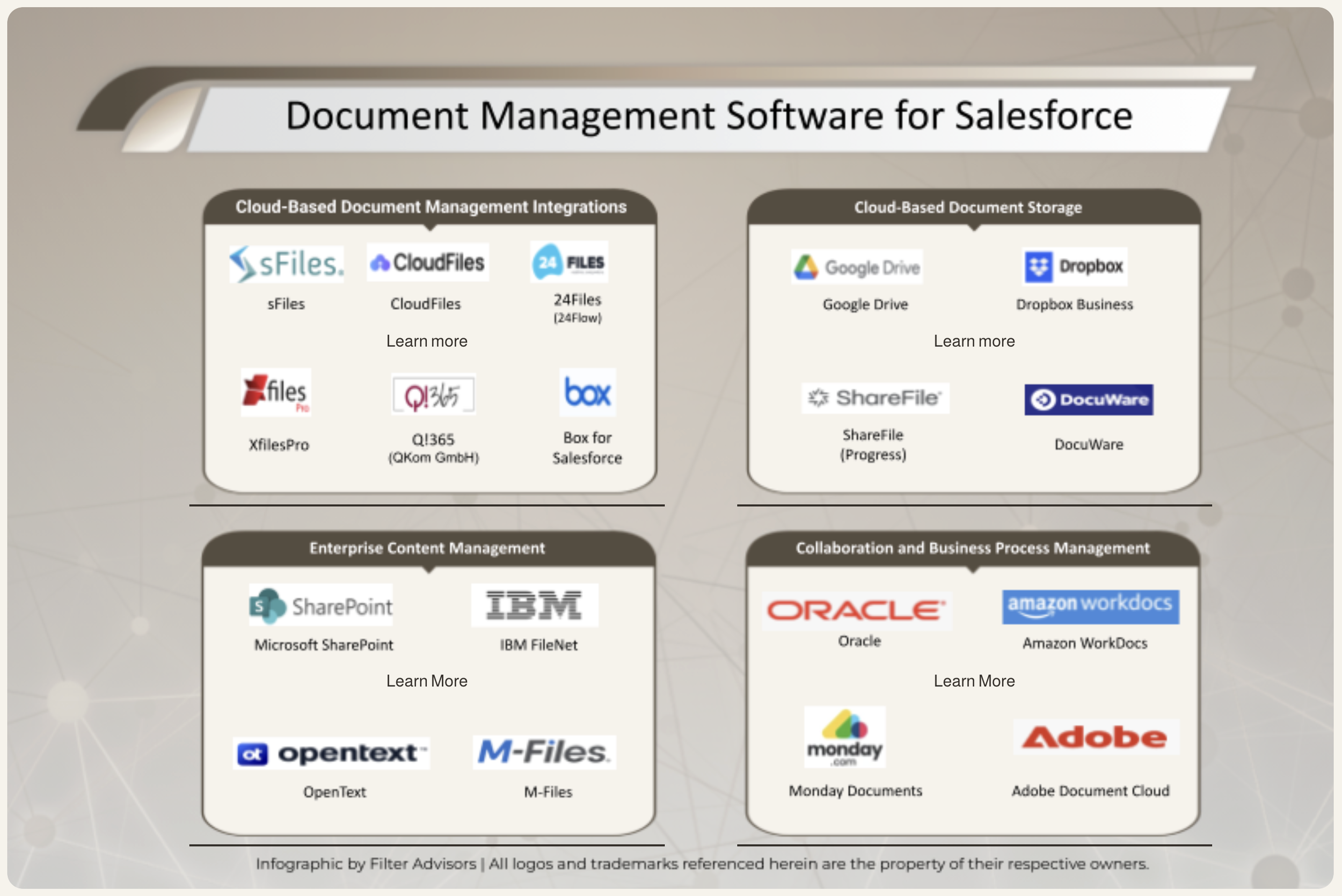
The Four Types of Document Management Software
To bring structure to the market, the Buyer’s Guide organizes solutions into four primary categories:
1. Cloud-Based Document Management Integrations
These tools focus on deep, native alignment with Salesforce. They support features such as automated, record-based folder structures, Salesforce file handling, collaboration tools, workflows, and external access via Experience Sites. This category is all about tight integration and seamless user experience.
2. Cloud-Based Document Storage
These platforms specialize in securely storing and managing documents online. They emphasize scalability, accessibility, reliability, and collaboration—but are often more storage-focused than Salesforce-centric.
3. Enterprise Content Management (ECM)
ECM systems offer robust capabilities for organizing, storing, and distributing digital assets. They typically provide centralized, searchable repositories with strong governance, access control, and compliance features—ideal for managing contracts, onboarding documents, and regulated content.
4. Collaboration and Business Process Management (BPM)
BPM is both a methodology and a technology approach used to analyze, optimize, and automate business processes. In this context, document handling becomes part of broader workflow and process optimization efforts.
06:21 Cloud-Based Document Management Integrations (here)
Why Cloud-Based Document Management Integrations Matter
Document Management Software is the umbrella category. Cloud-Based Document Management Integrations are a specialized subset—and the focus of this episode.
These integrations connect Salesforce directly with external document systems such as Microsoft SharePoint. The result is a unified experience where users no longer need to switch between platforms to access files.
Instead, documents are available directly within Salesforce records—streamlining storage, retrieval, version control, security, and compliance. Teams can collaborate more effectively, manage workflows efficiently, and maintain tight control over access and updates.
Because these integrations are more closely aligned with Salesforce than pure storage tools, ECM platforms, or BPM solutions, they deserve their own category—and a deeper evaluation.
08:53 Retail Document Management Use Cases: Lowe’s & Ross (here)
The Retail Spin: Real-World Use Cases
To make these concepts tangible, let’s look at two retail examples that show Document Management Software in action.
Lowe’s: Enterprise Collaboration at Scale
Lowe’s operates thousands of retail locations and supports over 260,000 employees. Their challenge was fragmented communication and inconsistent access to project files, customer documentation, and training materials.
By implementing Microsoft 365 - using SharePoint, OneDrive, and Teams -they centralized documentation, collaboration, and version control across the enterprise. Integration with Salesforce connected document libraries directly to CRM records, giving sales and service teams visibility into quotes, installation plans, and customer documentation within Salesforce.
The result was a unified view of each customer’s project lifecycle, improved collaboration, and consistent file access across retail systems.
Ross ‘Dress for Less’: Streamlining Store Remodels
Ross manages large-scale store remodel projects across hundreds of locations. Previously, these efforts relied on manual spreadsheets and disconnected communications.
By implementing a cloud-based documentation platform with structured workflows, templates, and approvals - and integrating it with Salesforce Service Cloud—Ross centralized remodel documentation, progress tracking, and vendor coordination.
Leadership gained real-time visibility into remodel status, budgets, and vendor communications directly within Salesforce. This reduced delays, eliminated version confusion, and improved overall execution.
15:08 Salesforce Document Management Integration Methods (here)
Integration Methods: How These Systems Connect
The Buyer’s Guide outlines three primary integration approaches:
Pre-Built Integrations
These are turnkey solutions such as Box for Salesforce or sFiles. They come with built-in UI, are easy to deploy, and provide a seamless user experience right out of the box.
API-Based Integrations
Custom-built connections using APIs offer flexibility and power, but require significant development effort and technical expertise.
Middleware
Tools like Zapier offer low-code or no-code automation for simple workflows. While useful for basic use cases, they typically can’t support the complex scenarios that pre-built integrations handle well.
One key takeaway: not all connectors are created equal. Understanding how documents are stored, accessed, and governed through an integration is critical to long-term success.
18:27 Document Management Software for Salesforce Conclusion (here)
What’s Next in the Series
In the next episode of this two-part series, we’ll dive deeper into Cloud-Based Document Management Integration vendors.
We analyze six leading solutions, starting with a high-level overview and then moving into a technical deep dive. Each vendor is evaluated based on integration methods, features, capabilities, and also very important, security considerations. The differences, trade-offs, pros, and cons are clearly outlined to support informed decision-making.
This podcast is based on the Buyer’s Guide, and the article makes an excellent companion piece. A link is included in the episode description.
Conclusion
Thanks for joining this episode of The Filtered Brew. We hope this discussion gave you practical insights you can apply to your digital strategy and client conversations.
For more software insights, episodes, and resources, visit TheFilteredBrew.com. And if you enjoyed the show, don’t forget to follow, rate, and share; it helps us reach more listeners like you.
This has been The Filtered Brew Podcast, where conversations are crafted, refined, and brewed to perfection.
Until next time, keep your ideas brewing. ☕
Podcast Transcript Chapters

Navigate Directly to Your Topic of Interest
00:00 Podcast Introduction – Tech Sales Podcast Overview & What You’ll Learn (here)
Hello. Get ready for some Tech Talk over coffee,
Where we filter through the latest digital tech one sip at a time.
Welcome to The Filtered Brew, a tech podcast all about software.
Your host is Digital Consultant, Preston Hurd.
So join us for a cup of coffee and let's get into what's brewing on today's menu.
00:49 Document Management for Salesforce (here)
Today's podcast is about Document Management Software for Salesforce.
Salesforce is the leading CRM platform globally.
However, maximizing its potential requires understanding the various Document Management Software options at your fingertips and how to make them work best for you and your clients.
With over 600 Independent Software Vendors (ISVs) on the Salesforce AppExchange dedicated solely to Document Management Software, and each providing a range of features, selecting the most suitable option for a client can be, well, a challenge.
While these apps may appear similar at first glance, they possess distinct storage and integration capabilities that serve very specific purposes.
The Buyer's Guide aims to assist IT leaders in navigating the ever changing landscape.
It streamlines the selection process, highlighting how the best options can boost efficiency and security simultaneously.
All while, integrating this tech with the other enterprise solutions your customers are using, like Microsoft SharePoint, Google Drive, and Box, for example.
This podcast episode gives you the clarity to lead the conversation.
02:17 Buyer’s Guide to Document Management for Salesforce (here)
Thanks Nick. Great introduction.
And one thing that you just brought up is that there's 600+ Doc Management Software solutions that are out there on the Salesforce AppExchange.
How do you choose the one for your clients that's the right one?
It's kind of a guessing game unless you have something along the lines of a Buyer's guide, which you mentioned.
We compiled this practical guide specifically designed to help Salesforce partners and admins make smarter recommendations and bring clarity within this crowded space.
And here's what's inside this Buyer's Guide that we created. And that's what this podcast is all about.
We're going to cover what are the top Document Management apps.
We're going to break it down, breaking down the apps into different categories. We're going to include side by side comparisons.
We're going to talk about the common pitfalls to avoid so that you can really understand what sets each app apart.
Because apps use the same buzzwords and a lot of times they step into each other's lanes with feature overlap.
And we're going to cover how you can add value for your clients.
Choosing the right app that's going to save your clients time and money. That's what it's all about.
We are going to of course include the Retail Spin, sharing some real world stories and use cases in the Retail space to be able to connect the dots in real life.
So I'm excited to get started. Diving right into it, tell us about the four types of Document Management Software.
04:14 Four Types of Document Management Software (here)
All right, here we go. Number one Cloud Based Document Management Integrations -we're talking about integrations here.
These are the tools that focus on providing that deep functionality and that close alignment to Salesforce when it comes to things like folder structures, collaboration features...
Automating record based folder organization, in Salesforce file handling and automated workflows, as well as external access through experience sites.
Number two - Cloud Based Document Storage These storage platforms really specialize in helping organizations manage and store documents securely and efficiently.
And think of about access. Think about managing documents online for greater scalability, collaboration and reliability.
Third - ECM (Enterprise Content Management) ECM systems are robust and they have robust capabilities for organization, for storing, for distributing digital documents and assets within a secure and accessible framework.
Maintaining that centralized, searchable repository of, let's say signed agreements or customer assets, onboarding documents with tools for access control and sharing...
And Number four - Collaboration and Business Process Management (BPM).
This really is more of a methodology when you think about BPM - Business Process Management, and the corresponding technology that comes with it.
It's used to analyze, optimize, automate, manage the business processes.
Think about integrating document handling into the overall process of optimization efforts through BPM. And that covers our four categories.
06:21 Cloud-Based Document Management Integrations (here)
Document Management Software has an identical name to its subcategory Cloud Based Document Management Software. What would be the difference between these two?
I'm glad you brought that up, Nick. It's intentional in that the names are very similar, they're not identical.
Document Management Software is the overall category and within that overall category, the umbrella if you will, we have Cloud Based Document Management Integrations.
The integrations is a component of the software and it connects and integrates Salesforce with Document Management Software, like let's say SharePoint for example.
And that eliminates the need to switch between the two different systems, Salesforce and SharePoint, to ensure that files are always accessible in the right place.
And this integration really streamlines the document storage, organization and retrieval, and version control, and security and compliance, and all these things and hence helps in collaboration by enabling efficient document sharing, workflow management and allowing teams to work more productively while maintaining control over the access and the updates.
Because this subcategory is so closely aligned, and it's more closely aligned than all the other categories…
It's more aligned than just the storage, more than ECM, the broader robust solution, and more than Business Process Management (BPM), more the methodology and process.
We've named it very similarly, calling it Cloud Based Document Management Integrations.
And that is the category that we're going to really focus on for today's podcast.
Thanks for breaking down the difference between the two and where we're going to focus today.
08:53 Retail Document Management Use Cases: Lowe’s & Ross (here)
Maybe it would help our listeners to hear some real world examples of Document Management Software being used. So how should the Retail industry approach this and how could this benefit a company in the Retail industry?
Well, it's always my favorite part of the podcast, Nick. To talk about Retail. We put the 'Retail Spin' on tech.
And I think you're right, real world stories (use cases) with a couple of Retail examples can really help to connect the dots on how this is applied.
So let's talk about a couple different Retailers. I don't think we've talked about either of these in any of our prior podcasts. So something fresh to talk about.
First, let's talk about Lowe's.
Lowe's falls under the hardware class of trade.
Lowe's is actually probably my favorite store to shop in when it comes to home improvements and things of that nature.
And Lowe's is a great example of Cloud Based Collaboration and Document Management Integration.
They had a challenge. They operated literally thousands of retail locations and had fragmented communication, inconsistent access to project files, customer documentation, training content...
And they needed a cloud based environment to centralize and store all of this.
They implemented Microsoft 365 / SharePoint / OneDrive / Teams to centralize documentation and collaboration and version control across the whole enterprise and integrated document libraries with field devices and store systems, allowing their associates to upload photos, proposals, design files from anywhere.
Integrated with Salesforce, they connected Microsoft 365 document repositories directly to the records within Salesforce and that enabled associates and support teams to view the related project files within the CRM interface.
And this allowed sales and service teams to track quotes, installation plans, customer documentation alongside opportunity and service case data.
And they really created a unified view of each customer project lifecycle.
So they benefited from this. They were able to improve collaboration, accuracy, file accessibility across their 260,000+ employees in multiple retail systems.
And they enabled end-to-end visibility between customer interactions in Salesforce, and related projects or design documentation in Microsoft 365.
So that really is a comprehensive story with one of the biggest Retailers.
Let's also look at Ross - Ross "Dress for Less". Ross, being a discount department store and what they did with cloud workflow for projects.
Specifically as it relates to store remodels and store remodel documentation. Here is the challenge that they were up against.
They managed large scale remodel and refresh projects across hundreds of stores and they were using manual spreadsheets in very disconnected communications to get this done.
They really needed a centralized system to standardize documentation, track progress and coordinate vendors and internal teams efficiently.
So with Cloud Storage and Integration, they actually partnered with Pivotal Retail Group to create a cloud based project documentation platform and they used layouts, store fixture plans, vendor contracts, progress photos and they were able to establish structured workflows and templates for approvals, updates and then reporting.
And they eliminated the reliance of email attachments and eliminated version confusion through this.
As it relates to their Salesforce integration, integrated project documentation and task data in Salesforce Service Cloud provided visibility across corporate project management and facilities teams and that enabled leadership and regional managers to track the remodel status, the budgets, the vendor communications all directly within Salesforce linked to each store and that particular store's location record within Salesforce.
So their benefit and outcome of this was really streamlining the whole remodel execution and improving the transparency between corporate, field, and vendor partners. This reduced project delays and increased documentation accuracy, improving overall connected cloud workflows and Salesforce linking reporting.
So two pretty comprehensive success stories there as it relates to Document Management Software.
That really sheds some light on how a Retailer might make use of this software. If they were to implement this software...
15:08 Salesforce Document Management Integration Methods (here)
What are the three methods of integrating Document Management Software?
Well, that's one thing that we cover in depth in this Buyer's Guide, and it's really important.
We talked earlier in the podcast about Cloud Based Document Management Software Integrations and that's really going to be our area of focus.
By that I'm talking about pre built integrations.
These are really turnkey solutions... Box for Salesforce or sFiles.
These are ready made integrations that you can buy or install and they already have built in UI.
It's seamless and user friendly and comes right out of the box.
The other couple options are API and Middleware.
So first let's talk about API. API is a custom integration.
It's a direct connection; it's built using an API and it's very flexible and it's very powerful, but it requires a lot of development work and expertise. Then there's Middleware.
Think about automation tools like Zapier, for example.
These are no code or fairly low code options that connect apps using triggers and actions.
And it's really great for simple workflows, but it doesn't handle the more complex use cases that the pre built turnkey integrations would.
Could you elaborate on the not all connectors are created equal concept in the article?
Absolutely. As I said, understanding integrations is really important.
And in the article, if you have a chance to go there and check it out, we're going to put a link into the podcast posting.
We really get into the weeds on this because it's important.
It's important to the success of the deployment of your Document Management Software solution.
And in this particular section of the article, we cover - as your system of record, let's say you use SharePoint along with your CRM Salesforce -
exactly how the customer interactions and the documents associated with them, is handled through the integration.
We cover the buzzword definitions, we cover what you should consider when you evaluate integrations. We talk about how to test that an integration works for you. So highly recommend you do that deeper dive in the article because as you said, not all connectors are created equal.
18:27 Document Management Software for Salesforce Conclusion (here)
We're going to talk about that next when we get into the specific vendors, the integration vendors that are these pre built turnkey solutions and what are the differences
What are the strengths of the various options that you have for those out of the box solutions?
And that's really where we're going to focus.
Okay, so let's talk about these integrations. What are the differences between them?
Well, in this category, Nick, we looked at six of the leading companies and we looked at first high level, who they are, and then we did a deep dive technical analysis for each one.
We looked at their integration methods, we looked at their capabilities and their features, and then we also looked at security considerations, which is very important. So we've broken that down for all of the six companies that we looked at in this space and there are distinct differences, pros and cons, between them.
Okay, that sounds really valuable for making the right decision of which software to go with and to really understand not only who the specific companies are, but especially the pros and cons.
So in our next episode of this two part series, we're going to continue this conversation really focusing on the subsection of Cloud Based Document Management Integration.
And like it was mentioned before, the podcast is based on the Buyer's Guide that you published and a link to this article is going to be posted in the description.
Follow that link and check it out. It makes a great companion piece to this podcast.
Thanks so much for listening to this episode of The Filtered Brew Podcast.
We hope you enjoyed the conversation and took away some insights that you can apply to your own digital strategy.
Be sure to visit TheFilteredBrew.com it's the place to go for the latest software tech insights and where you can find more episodes and and additional resources.
If you liked what you heard today.don't forget to follow, rate and share the show.
It really helps us grow and reach more listeners like you.
This has been The Filtered Brew Podcast where conversations are crafted, refined and brewed to perfection.
Until next time, keep your ideas brewing and visit TheFilteredBrew.com
